
A guide to better newsletters
A good newsletter has a clear purpose, readers you know and content that gives something back. This guide takes you through the whole process: planning, content, writing, design, your mailing list, deliverability and the GDPR.
You get practical tips and newsletter examples, whether you write to customers, members or colleagues. Read it from the start or jump to the section you need.

A good newsletter in seven steps
Creating a good newsletter takes seven steps: decide on your audience and purpose, set goals, plan your sends, choose useful content, write concisely, give the newsletter a clear design and follow up on the statistics.
Why newsletters work
A newsletter is a simple way to stay in touch with customers, members and colleagues. You reach many people at once, you control the channel yourself and you can see right away how your email was received.

- Builds loyalty among new and existing customers
- Drives visitors to your website
- Easy to measure with opens and clicks
- The content can be tailored to each audience
- Works for both information and sales
- Opens up a dialogue, for example with a short survey
- The recipients have chosen to subscribe themselves
- Low cost and often high impact
Easy to reach the right audience
You can divide your recipients into groups and give each group what it wants to read. Customers who have shown interest in a particular product get one newsletter, your staff get another. When you see who opens and clicks, you quickly learn what works.
Build relationships and your brand
Subscribing is an active choice, and that makes it easier to build a relationship. Share tips, news and inspiration, and invite a dialogue. A simple question at the end of the newsletter gives you both answers and ideas for the next one.
Response at a low cost
Sending a newsletter costs little compared with many other channels, and you see the results the same day. That is why newsletters suit a small business just as well as a large organization.
Aren't people's inboxes already overflowing?
Yes, many people get a lot of email. But relevant newsletters still get read. What makes the difference is that the newsletter gives the reader something, that it is well thought out and that you don't send too often.
Control who gets what, so that the content suits the person reading it. A well-planned newsletter with a clear purpose is appreciated more than spontaneous sends and generic advertising. Avoid long texts without a point and the same message to everyone.
Measurable response
You can see how many people opened the newsletter, which links were clicked and what the recipients did next. That lets you experiment with subject lines, content and design, and learn something from every send.
| Metric | What it shows | Good to know |
|---|---|---|
| Open rate | How many opened the newsletter | 20 to 40 percent is common, but Apple Mail opens many emails automatically and pushes the figure up |
| Click rate | How many clicked a link | The most reliable sign that the content was interesting |
| Unsubscribes | How many left the list | If they rise after a particular newsletter, the content or the pace was wrong |
| Bounces | Addresses the newsletter didn't reach | Remove them, as they hurt your deliverability |
Read more about how to interpret your email statistics.
An information channel or a sales channel?
A newsletter can both inform and sell, sometimes in the same send. Start from the recipient. If the content is useful, the newsletter gets read, and then your offer gets attention too. Newsletters that do nothing but sell soon end up in the trash.
Content still matters most
It doesn't matter how often you send or how many recipients you have if the content isn't good enough. Pick out the most important messages, write clearly and make the newsletter easy to take in.
Remember: one well-thought-out send now and then beats many without clear value. A newsletter that gives the reader something gets read, saved and sometimes forwarded.
How do I make a strategic plan for my newsletter?
A simple plan saves you time and spares you last-minute stress. You know who you want to reach, what you want to say and how often to send. It also becomes easier to see what works.
1. Who are you writing to?
Customers, partners, members, residents and colleagues want different things. Customers are often interested in news, tips and offers. An internal newsletter is more about what is happening in the organization. If you write to residents, partly different conditions apply; read the guide to newsletters in municipalities and regions.
Think about which questions your recipients usually ask and which topics engage them. The more you know, the easier it is to choose your content.
2. What do you want to achieve?
Write down why the newsletter exists and what the recipient should get out of it. A few examples:
- Show new products and attract visitors to your online store
- Help recipients in their everyday work with guides and tips
- Tell people what is happening at the company
- Build community and motivation internally
3. Set a few simple goals to measure
It doesn't have to be advanced. Choose two or three things to track, for example:
- 50 new subscribers in three months
- An open rate above 40 percent
- More answers to a survey or question in the newsletter
4. How often should you send?
Once a month is about right for many. If you have a lot to tell, you can send more often. The important thing is to keep a steady pace so that recipients know what to expect. Feel free to say in your first newsletter how often you will be in touch. If you have nothing new to share, it is better to wait a week.
5. Make a simple schedule
Plan six months or a year ahead: themes per month, important dates and who is responsible for text, images and sending. Book a recurring slot in your calendar for the newsletter, and it will get done.
More practical tips for your planning
- Keep an idea bank of topics, questions and tips
- Test different subject lines – the simple ones often win
- Ask your recipients what they like and what they miss
- Clean up your list now and then and invite new subscribers
- Follow up on what gets opened and clicked
- Change your approach if something isn't working

Newsletter examples
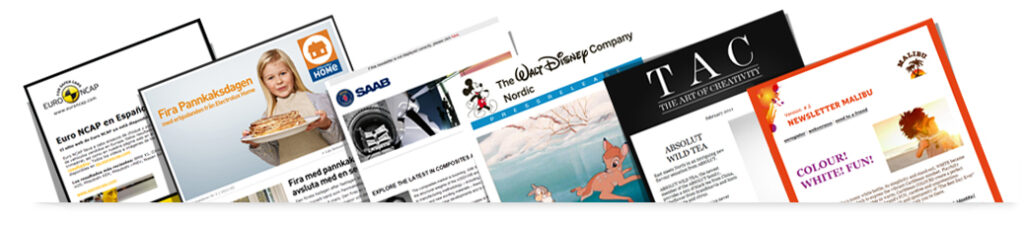
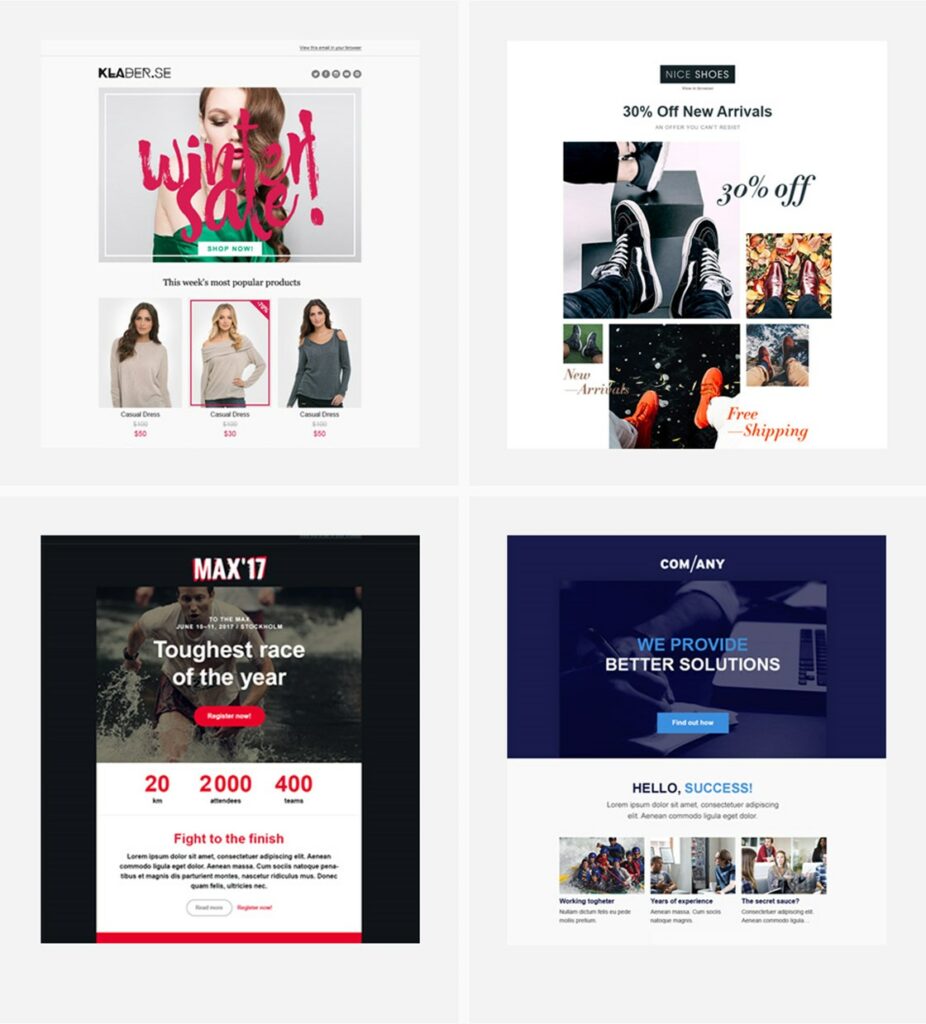
Good newsletters look different, but they have a few things in common: a clear sender, a handful of news items with short texts, images that support the content and a button that shows what the reader can do. Here are examples of what newsletters from Paloma's customers can look like.
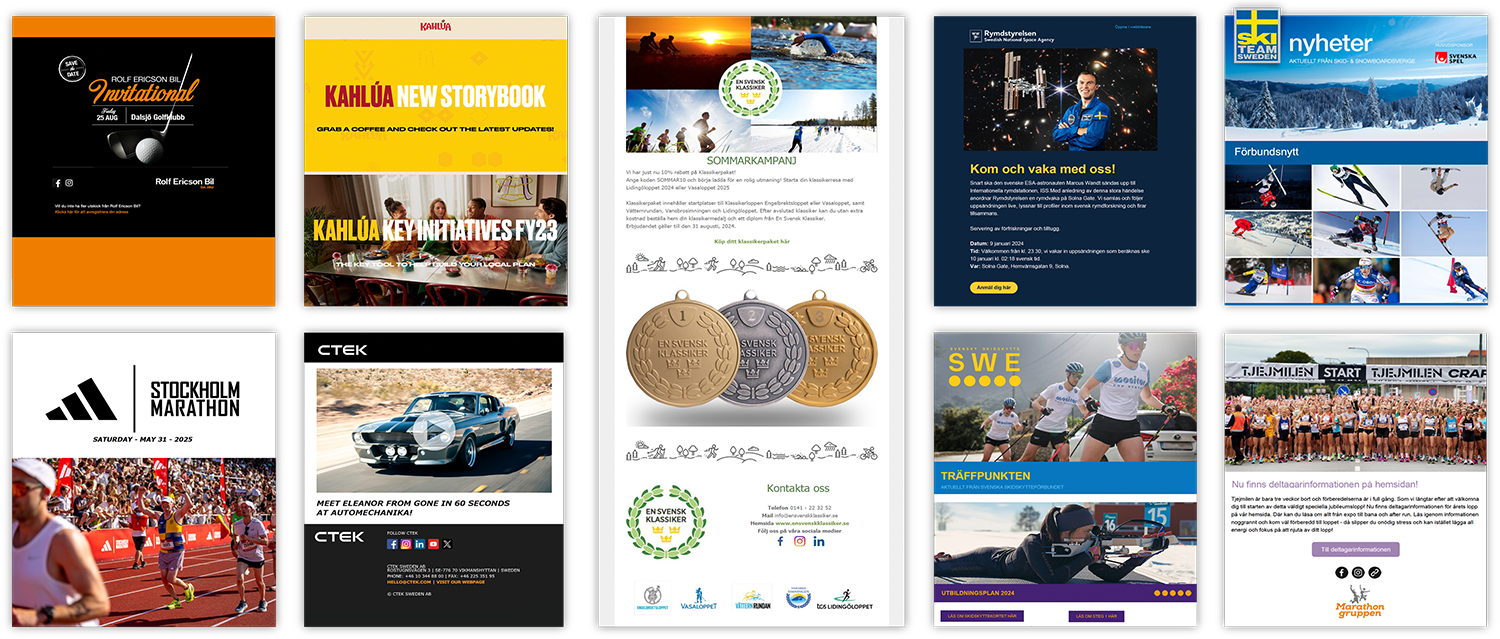
When you look at examples, notice the following:
- The logo and sender are visible at the top
- The most important news comes first
- Each news item has a heading, a short text and a link
- The images are few and belong to the content
- The button has a clear call to action
- Colors and fonts follow the brand guidelines
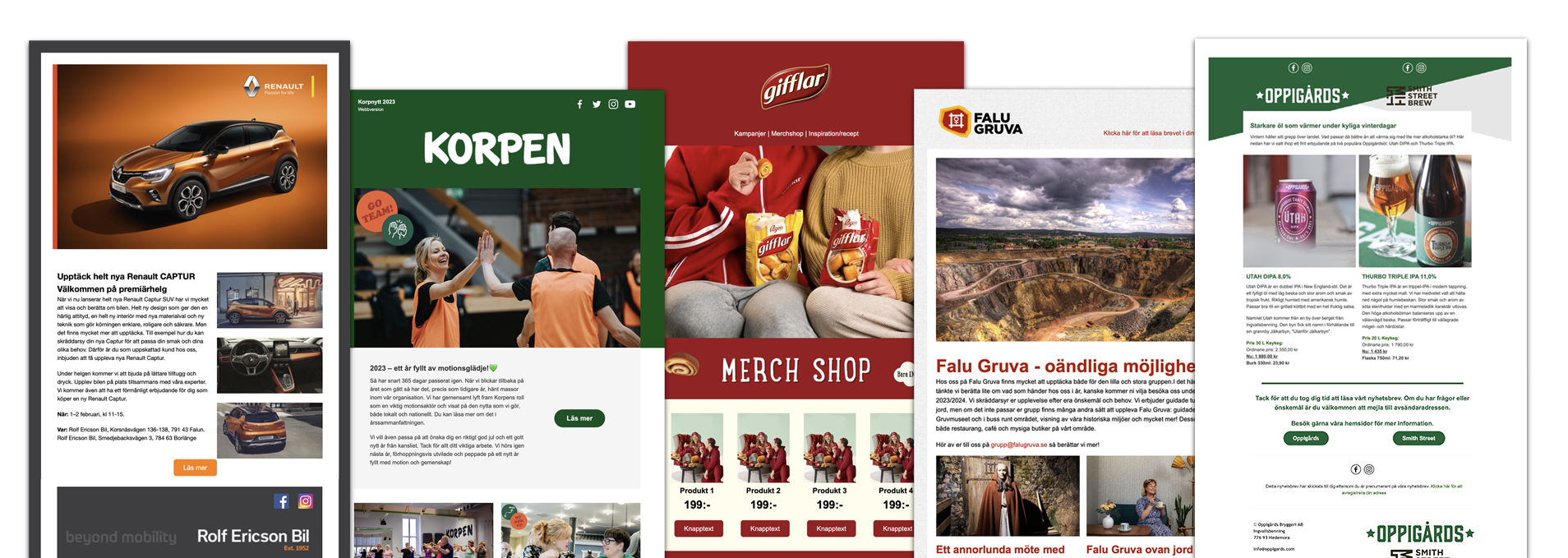
Examples of newsletter content
- Customer stories: an example from a customer or a project.
- Comments on industry news: your take on what is happening right now.
- The expert explains: a colleague clears up something many people find complicated.
- Guides and tips: how recipients get more out of your products.
- Invitations: to webinars, seminars and meetups.
- Most popular: what got the most clicks in earlier newsletters.
How to keep your newsletter interesting over time
Getting started is often easy. The hard part is keeping the newsletter worth reading a year later. Six things help:
It is perfectly fine to reuse content now and then, but always give the recipient something new in every send. A short tip, a checklist or an inspiring image goes a long way.
Sending your newsletter
Set aside time in your calendar for every send, with a margin for reading it through and making changes. Feel free to split up the work: write one day, gather feedback the next and send on the third. The content should still be current when you press send.
Keep public holidays and vacations in mind. A regular newsletter that arrives when everyone is off easily drowns in the inbox.
Tips for better timing and quality
- Don't send right after a holiday
- Finish the newsletter the day before you send it
- Let a colleague read it before you send
- Have a fixed working session every month
How do I create content for my newsletter?
The content decides whether the recipient opens, reads and stays on as a subscriber. Start from what your audience benefits from: things that inspire, teach something or make everyday life a little easier.
Always think added value
A simple rule of thumb is that 80 to 90 percent of the content should give the reader something and no more than 10 to 20 percent should be pure sales. Before every send, ask yourself: would I want this in my own inbox?
Write a content statement
Briefly describe what the newsletter is about and what subscribers can expect. For example: "In our newsletter you get practical tips, insight into the industry and inspiration that makes your everyday life easier." Then stick to that line.
Let your channels work together & mix your material
Highlight blog posts, guides, videos and podcast episodes in the newsletter and link back to your website. Not everything has to be newly written. Often it is enough to repackage what you already have.
Plan & prepare newsletter content
Decide on a fixed structure, for example a tip, a piece of industry news, a short interview and an offer. Prepare what you can in advance and leave room for what is current.
Avoid filler and unnecessary extras
In-jokes and images that have nothing to do with the topic make the newsletter less interesting. Spend your time on the parts that give the recipient something.
Content ideas
Feel free to mix several kinds of content in the same send. Here are eight ideas that usually work, whether you write to customers, members or colleagues.
Want more ideas? The guide to newsletter content has 17 content ideas.
Shape the content & finish your newsletter
Most people skim their inbox looking for something relevant. That is why structure and clarity matter just as much as the content itself.
Test and read it through before you send
Send a test to yourself or a colleague. Check that links and images work and ask for quick feedback. It takes a few minutes and catches most small mistakes.
How should I write to get read?
Writing a newsletter is different from writing a report. You have a few seconds to catch the reader's interest, and many people read on their phones.
Always start with what matters most
Put what is new and relevant to the reader in the headline and the first paragraph. Background and explanations can come further down.
Before: Malmö, 30 June 2025, project council. Representatives of school management, construction companies, the construction industry and the regional associations in Skåne meet to discuss important future issues for the region's construction industry. How we can turn new knowledge and research in energy and climate into knowledge among the students in the building and construction program is an important question.
After: Construction teachers in Malmö have gained new energy and climate skills. A new project has started to adapt the programs to energy and climate needs.
In the first version, the interesting part comes last. In the second, the reader knows right away what has happened.
Write for the reader
Think about what the recipient cares about and which problems they want to solve. Write "you" and speak directly to the reader, as in a conversation. Put less weight on the company and more on what the reader gets out of it.
Structure your text smartly
- Introduction: a short summary that shows what the newsletter is about.
- Headlines: clear rather than clever. They should make sense without context.
- Subheadings: break up longer texts so that the newsletter can be skimmed.
- Bullet lists and fact boxes: for things that should be easy to find.
Keep it to the right length and edit afterwards
It is harder to write short than long, but short newsletters get read by more people. Cut everything that doesn't add something, read the text aloud and, if you can, have someone else read it before you send.
Get your paragraphs & formatting right
Text with plenty of space is easier to read, especially on a phone. A few simple rules of thumb make a big difference:
- New paragraphs often. Start a new paragraph when you change topic. Better one paragraph too many than one that is too long.
- A blank line between paragraphs. It gives the text air and works better on screen than indents.
- Avoid capitals and italics. Text in capital letters is hard to read and comes across as shouting.
- Bold in moderation. Only highlight what matters most, or it loses its effect.
- Vary your sentence length. Short sentences are easy to read, but only short ones make the text choppy.
- Cut at the end. Often a third can be removed without losing anything important.
Avoid common mistakes
Mixed-up words
"Your" instead of "you're" gives a careless impression.
Too many exclamation marks
One is enough. More make the text messy.
Relying on the spell checker
Always read it through yourself, and if you can, let the text rest until the next day.
Write newsletters & web copy like a journalist
A few simple tricks from journalism make your texts more lively, whether you write for a large organization or a small business.
Use quotes
Let customers, colleagues or experts have their say. It is more credible when someone else says something is good than when you say it yourself. For example: "We saved several hours a week thanks to their tips," says Sara at Ekonomibyrån. Newspapers and style guides set quotes in different ways. Choose one style and stick to it.
Back up your claims
Support your advice with figures, surveys or concrete examples, and give the source. That makes it easier for the recipient to trust what you write.
Good-to-have questions
Check that the text answers the classic questions:
- What? What is happening or being offered?
- When? When does it happen, and what is the deadline?
- Where? Online or on site?
- How? How does it work, and how do you take part?
- Why? Why is it interesting for the recipient?
- For whom? Who benefits from it?
Dare to be human and concrete
Write the way you talk, and feel free to tell a story. Then the newsletter feels like a conversation and not like an advertisement. If you want help with your texts, read the guide to AI for newsletters.
How do I get the layout and design right?
A clear design means more people bother to read and act. Start from a simple, mobile-friendly template. You will find ready-made newsletter templates to start from.
Don't forget the essentials
- A clear link to unsubscribe
- A link to the web version, preferably at the top
- Links that stand out, with color or underlining
- Alt texts on all images
Always preview the newsletter on a phone and in a couple of common email clients before you send. What looks good in your own inbox doesn't always work for everyone, so test different versions and follow the statistics. Also read the guide to accessible newsletters.

Where do I find the email addresses?
A good newsletter needs a good mailing list, and quality beats quantity. A small list of engaged subscribers gives better results than a long list where no one opens.
Always ask for permission before you add someone. Say what subscribers will get, how often the newsletter arrives and who is behind it. Clear information makes more people willing to sign up.
How to collect addresses in practice
- Put a simple form on your website, preferably on the home page and in the footer.
- Ask when people order, contact you or visit your store.
- Add a newsletter checkbox when someone buys, books or downloads a guide.
- Mention the newsletter on social media and link to the form.
- Offer something in return, for example a guide or a discount.
- Link to the form in your email signature.
Feel free to encourage your subscribers to tell friends and colleagues about the newsletter. But remember: everyone must give their own consent, including people who were recommended it.
How do I look after my mailing list?
Caring for your list is just as important as collecting new addresses. The better you know who receives your emails, the easier it is to send the right things.
Segment and tag your addresses
Divide the list by, for example, region, industry, interests or purchase history. With segmentation, each group gets content that suits it, and you get a better response.
Adapt and adjust based on statistics
See which groups open and click, and which have lost interest. Try a slower pace or different content for those who aren't active. Don't remove anyone straight away; sometimes people are just busy.
Clean up and keep the list current
Remove addresses that bounce or are misspelled. If you have many old addresses, you can send an email asking whether the recipient wants to keep subscribing.
Make it easy to subscribe and unsubscribe
It should be just as easy to leave the list as to join it. A clear unsubscribe link in every newsletter is a legal requirement, and it builds trust.
How do I make sure my emails are delivered?
Sending a newsletter doesn't mean it lands in the inbox. Deliverability is about making sure the email arrives and doesn't get stuck in the spam folder.
Keep track of your technical sender
Send from an established tool and make sure your domain has SPF, DKIM and DMARC. Since 2024, Gmail and Yahoo require bulk senders to have all three in place, offer one-click unsubscribe and keep their spam complaint rate below 0.3 percent. Read the guide to SPF and DKIM.
How to improve the chances that your newsletter arrives
- Only send to people who have given consent
- Let new subscribers confirm their address
- Keep your list free of old addresses
- Use a clear sender with a name
- Write honest subject lines without capital letters
- Send when you have something to say
Avoid being classed as spam
Spam filters react to overly salesy subject lines, lots of exclamation marks, large attachments, emails that consist almost entirely of images and unclear senders. Write clearly and honestly, and feel free to use the recipient's name.
Follow up on complaints and statistics
If many people mark the newsletter as spam or never open it, that is a sign to review your content and your list. You can check your domain's status at spamhaus.org. Also ask your recipients to add your address to their contacts. Learn more in the guide to newsletter deliverability.
How do I comply with the GDPR?
When you send newsletters, you handle personal data, and then the General Data Protection Regulation (GDPR) applies. At heart, it is about respecting the recipient's privacy.
Consent is always best
The recipient must have said yes themselves, for example by filling in a form. Pre-ticked checkboxes don't count. You must be able to show when and how consent was given.
Legitimate interest: when it is okay anyway
In some cases, you can send information to existing customers on the basis of legitimate interest. In Sweden, the Marketing Act also applies: advertising by email to private individuals requires prior consent, except for your own customers who receive advertising for similar products and can easily opt out. Read more in our GDPR guide.
Be open and clear with the recipient
Explain at sign-up what the address will be used for, how often the newsletter arrives and that it is always possible to unsubscribe.
Create and document your consent routines
Keep track of where and when the addresses were collected, review older lists and have a routine for deleting data when someone asks you to.
Offer options and choices
Let recipients choose which topics or newsletters they want, for example in the sign-up form. That gives more relevant emails and fewer unsubscribes.
The short checklist for GDPR and newsletters
- Ask for clear consent, or have a basis in a customer relationship.
- Say what you will send and how often.
- Make it easy to unsubscribe.
- Don't keep personal data longer than necessary.
- Have a routine for deleting data on request.
Paloma and the GDPR
In Paloma, you manage subscriptions, consents and unsubscribes in one place, and all data is stored on servers in Sweden. Read more about how Paloma works with the GDPR.
How to create your newsletter in Paloma
Paloma is a Swedish newsletter platform, developed in Hedemora since 2003. If you want to compare first, see our comparison of seven newsletter tools. With our newsletter tool, you go from idea to send in four steps:
Gather your contacts
Import a list or let new subscribers sign up through a form.
Choose a template
Start from a ready-made template that works on both computers and phones, and add your logo and colors.
Build the newsletter
Drag in text, images and buttons. Send a test to yourself before you move on.
Send and follow up
After sending, you see the opens, clicks and unsubscribes for every newsletter.
The free account covers 250 emails a month, with an unlimited number of contacts and no card details required. Paid plans start at 95 SEK a month with no lock-in period, and the support is personal.
Frequently asked questions about newsletters
How do you write a good newsletter?
Start with what matters most, keep it short and focus on what the recipient benefits from. Use a clear subject line, short paragraphs, subheadings and a call to action that is easy to find. Read the text aloud and send a test before the real send.
Can I see examples of good newsletters?
Yes. In the section Newsletter examples in this guide, you can see what newsletters can look like and what they have in common: a clear sender, a handful of news items with short texts, images that support the content and a clear button.
How often should you send a newsletter?
Once a month is a good start, and for many, once or twice a month works well. What matters most is a steady pace and that every send has something to offer. If you have nothing new to share, it is better to wait.
When is the best time to send a newsletter?
No time suits everyone, but weekday mornings usually work well. Test different times and follow the statistics to see when your recipients are most active.
What is a good open rate for newsletters?
Between 20 and 40 percent is common, but it varies by industry and audience. Apple Mail opens many emails automatically, which pushes the figure up. So compare with your own earlier sends, and look at the click rate as well.
How do you write a good newsletter subject line?
Keep it short, preferably under 40 characters, and say clearly what the recipient gets. Avoid capital letters and sales phrases. Questions, numbers and a personal tone often work well. Test two versions against each other and see which gets the most opens.
How do I get more people to click in my newsletter?
Have a clear call to action, short texts and buttons that stand out. Divide your recipients into groups so that the content suits the person reading it. The more relevant the newsletter is, the more people click through.
What is A/B testing of newsletters?
A/B testing means that you send two versions of the same newsletter to two parts of your list, for example with different subject lines, and compare which one gets the most opens or clicks.
How do you get more subscribers to your newsletter?
Put a sign-up form on your website, ask when people buy from or contact you, mention it on social media and offer something in return, for example a guide or a discount. Everyone must give their own consent.
Can you send newsletters under the GDPR?
Yes, if the recipient has given their consent. In some cases, you can send to existing customers on the basis of legitimate interest. Every newsletter must have a clear unsubscribe link.
Can you send newsletters for free?
Yes. With Paloma's free account, you can send up to 250 emails a month to an unlimited number of contacts, without card details and with no lock-in period.
What is the difference between a newsletter and other email marketing?
Newsletters are sent regularly with information, tips and news. Other email marketing is more often campaigns focused on sales, or automated emails such as welcome emails. In practice, they overlap.
Create your next newsletter in Paloma
Choose a template, add your content and send. You are up and running in minutes.
Create a free accountRead on: email marketing, a complete guide and tools for sending email.