Newsletter statistics

How do you interpret statistics for newsletters and email sends?

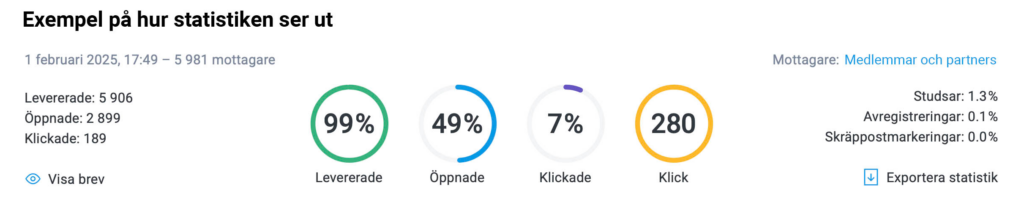
Under the statistics tab in Paloma's tool, you can see how your newsletter is doing after you have sent it. There you can see the following:

  • Overview
  • Delivery
  • Opened
  • Clicks
  • Unsubscribes and spam reports.

But why should you look at it? And how should you interpret what you see there? It can be hard to grasp at first, but with the help of this guide it will probably be a little easier.

If you want to work in a more structured way with follow-up and analysis, you can use a newsletter tool where statistics, sends and recipients are connected.

Overview

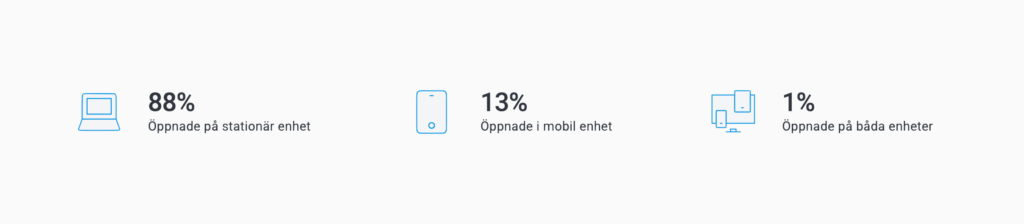
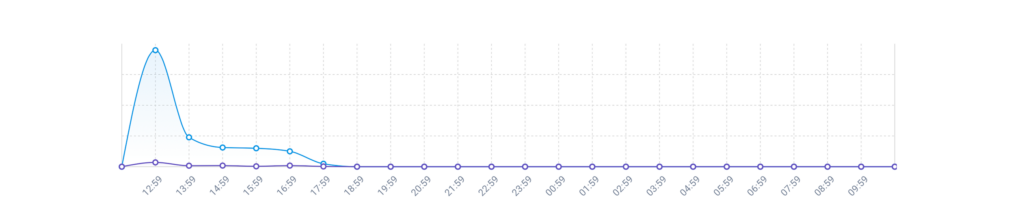
In the overview, you can see which links the recipient has clicked in your newsletter, which clients and devices the newsletter has been opened in, and a graph that shows the open rate over 24 hours. Simply put, the overview gives you a quick picture of how your newsletter is doing. We go into what the open rate graph means a little further down in this guide.

Do you want to start sending newsletters right away? See how you can create and send newsletters in Paloma.

Delivery

Under the delivery heading, you can see the following:

  • Delivered
  • Not delivered
  • Soft bounces
  • Hard bounces.

It is important to keep an eye on how many of your messages have arrived, because it is not very effective to send newsletters to a recipient who never reads them. Delivered shows, as the name suggests, how many sends have reached the recipient.

Not delivered

Under this heading, you can see a summary of soft bounces, hard bounces and blacklisted addresses. But what does that mean?

In short, a soft bounce means that a recipient for some reason temporarily cannot receive the send. A hard bounce is caused by incorrect addresses, addresses that do not exist or that have a permanent error, so that sends cannot be delivered to them. It is a good idea to try to keep bounces below 5%. Paloma's newsletter tool handles soft and hard bounces for you, and you can read more about that in our help center (in Swedish).

A blacklisted address is a recipient who has declined all future email sends from you. If the address is still on a list that is used for a send after that, the newsletter bounces back, and the address is marked as blacklisted in the statistics. It is then unsubscribed from that mailing list.

Opened

Under this heading, you can see how many newsletters have been opened and how many have not been opened. You also get a summary of which devices were used to open them, when the recipients opened them and the number of clicks in your newsletter.

When you look at the numbers here, think about what the content of the newsletter was and whether the numbers change in relation to it. That can help you understand what works for your recipients, and what does not. Aiming for 30–40% of your newsletters to be opened is a reasonable goal.

Open rate and its new meaning

The open rate tells you how many recipients have opened your newsletter. Here it can be interesting to look at when the newsletter was opened – did the recipient open it right away? That gives an indication of how much interest there is in your newsletter. It is important to keep in mind, however, that there is usually a positive hidden figure, which means that more people may have opened the newsletter than the measurement shows.

The open rate is measured through a pixel that is included in the newsletter that is sent out. When it is loaded, the newsletter is counted as opened. That makes it important that the recipient loads the newsletter's images. We therefore encourage our users to create newsletters where the recipient needs to scroll and click in the newsletter, so that it cannot simply be read in preview mode.

On September 20, 2021, iOS 15 was released, and with it came a new privacy protection for Apple Mail. The protection prevents several types of tracking and measurement on the user's side. This means that you who send newsletters, or use other email marketing, will no longer see whether a recipient who has activated the privacy protection has opened your email or not. In the long run, this means that the open rate will not be as interesting to measure anymore, and will therefore decrease in importance.

Clicks

Under clicks, you get a summary of who has clicked and where, under not clicked you can see which recipients have not clicked, and in the link overview you can see which links have been clicked and how many times.

To get more out of the statistics, you also need a clear plan for the sends themselves. Read more about how you can create and send newsletters in Paloma.

Which key metrics should you follow in newsletters?

The most important key metrics in newsletters are delivery rate, open rate, click rate, unsubscribes and any conversions. Together, they show whether your send gets through, sparks interest and leads on to action.

  • Delivery rate – how many sends actually arrive
  • Open rate – how many open the newsletter
  • Click rate – how many click through
  • Unsubscribes – how many choose to leave
  • Conversions – how many complete the desired action

What are good statistics for newsletters?

What counts as good statistics for newsletters depends on the industry, the target audience and the type of send. As a benchmark, many look at open rate, click rate, unsubscribes and deliverability. A newsletter with a high delivery rate, a stable open rate and few unsubscribes often gives a good basis for further optimization.

The most important thing, however, is not to compare individual sends, but to follow the development over time. When you see how the statistics change from one send to the next, it becomes easier to understand what works and what needs to be improved.

How to use the statistics to improve your next newsletter

Statistics are most valuable when you use them to adjust your next send. If the open rate is low, you can test new subject lines or other send times. If the click rate is low, you can review the content, structure and call to action. If many people unsubscribe, it can be a sign that the content does not match the recipients' expectations.

By continuously analyzing the results, you can improve your newsletters step by step and get more out of every send.

Engage your subscribers

Why is this interesting to look at, and how do I read what I see? Of course, it is important and interesting for you as a sender to understand what engages your recipients. If they click, you can assume that you have caught their interest. And this is a number that is good to follow up continuously. Generally, you can say that a click rate below 10% is low, and above 30% is really good. If you are interested in comparing yourself with a competitor, it is important that you do it with someone who offers roughly the same as you.

Unsubscribes and spam reports

Under this heading, you can see who has unsubscribed from your sends, why they did it and at what time. Spam reports show which recipient has marked your send as spam, and on which date it happened.

Having a zero vision here is probably unattainable. So how can you learn from the numbers you see here? The numbers say everything about your newsletter, whether the content suits the recipient and whether it is relevant. If a subscriber unsubscribes, it is important to analyze why, so that you can develop and improve. In terms of numbers, you can go by the following:

  • If your unsubscribes are at or below 0.5%, you have either succeeded incredibly well with your send, or you have made it far too hard to unsubscribe. Here you know best what applies to you.
  • If they are at 2% and above, you should start looking into what the high unsubscribe rate is caused by. One thing you can look at is whether your subscribers made a conscious choice to sign up for your newsletter, or not. If not, part of the answer may lie there.

Remember to look at how the numbers change after each send. If you have an unsubscribe rate of 0.5% on one send, and then 3% on another, it is of course clear where the cause lies.

Deliverability

Look at the deliverability of your sends, which in short is about what can affect whether a recipient chooses to unsubscribe from your sends, mark them as spam or, in the worst case, blacklist you. Read more in our guide to deliverability.

TIP: Conversion rate via Google Analytics

This is something that is not noticed right away, but for many it is an important goal further down the line – namely conversion. And you can look at how many conversions your send contributes to by using Google Analytics for conversion tracking.

What a conversion is depends on what you measure and what you want the reader of your newsletter to do. Do you want the recipient to order a service? Or perhaps sign up? You decide, and then analyze your conversion rate based on that.

Frequently asked questions about newsletter statistics

What is a good open rate for newsletters?

A good open rate for newsletters is often somewhere between 30 and 40 percent, but it varies depending on the industry, the target audience and the type of send you make. The most important thing is not to compare yourself blindly with others, but to follow how the open rate develops over time in your own sends. If it rises or stays stable, it is often a sign that your subject lines, content and send times work well.

What is a good click rate in newsletters?

A good click rate in newsletters depends on the content and what the recipient is expected to do, but generally you can say that below 10 percent is low and above 30 percent is very good. The click rate shows how engaging your content is and whether your links, messages and calls to action actually get the recipient to act. That is why clicks are often a more useful key metric than opens alone.

Why is the open rate falling?

The open rate can fall for several reasons. It may be that the subject line does not spark enough interest, that the send arrives at the wrong time or that the content no longer feels as relevant to the recipient. It can also be affected by technical changes, such as privacy protection in email clients, which means that opens are not always measured in the same way as before. If the open rate falls, it is wise to test subject lines, segmentation, send times and content to find what works better.

What does deliverability mean in email sends?

Deliverability in email sends is about how large a share of your sends actually reaches the recipients' inboxes. It is affected by, among other things, list quality, sender reputation, technical settings and how recipients interact with your newsletters. If many addresses bounce, if the sends are marked as spam or if few recipients engage, deliverability can get worse. That is why deliverability is an important part of succeeding with newsletters over time.

How do you interpret unsubscribes in newsletters?

Unsubscribes in newsletters are an important signal of how well your content matches the recipients' expectations. A low unsubscribe rate is often a sign that the sends are seen as relevant, while a clear increase can mean that the content, frequency or target audience needs to be reviewed. The most important thing is not to fixate on a single number, but to compare several sends over time. If unsubscribes suddenly increase after a particular newsletter, there is often something in that particular send that is worth analyzing more closely.

Related guides on newsletters and email sends

Read more about how our newsletter tool works before you try it.