Manage your leads with data-driven intuition – use automatic scoring in your flows.
How the scoring works
A visitor to your site downloads a PDF and registers their email address. A recipient of your newsletter clicks a certain link in the email. These are examples of events that can be registered in marketing automation. You decide how many points an event should be worth.
Examples of grading events
The recipient …
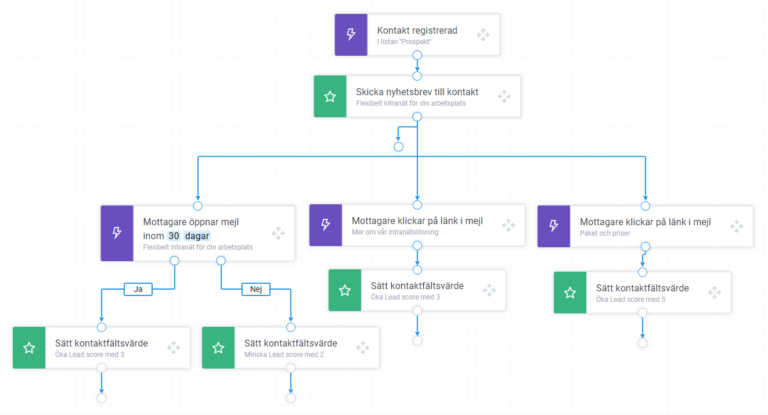
… opens a newsletter – 3 points are added to the contact's lead score.
… does not open the email within 30 days – 2 points are deducted from the contact's lead score.
… clicks link A More about our intranet solution in the email – 3 points are added to the contact's lead score.
… clicks link B Packages and prices in the email – 5 points are added to the contact's lead score.
Filter flows
You can filter your automated flows based on scoring, as well as on other data registered in the system.
Examples of conditions for filtering a flow
The recipient …
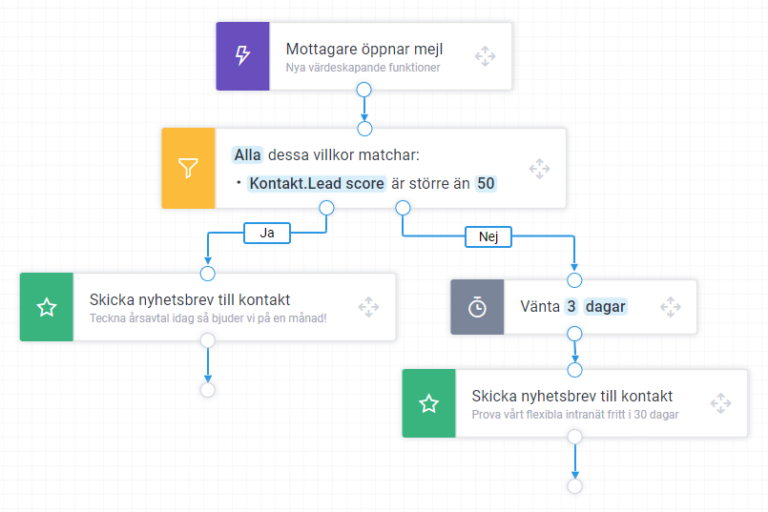
… has a lead score above 50 – a converting email is sent.
… has a lead score below 50 – after 3 days, an offer that sparks interest is sent out.
Sort contacts
You can easily see which contacts have high and low scores, and sort your contacts and contact lists based on lead score.
Lists for sends
Create lists for sends where a lead score above or below a certain number of points is a criterion, also in combination with more criteria based on other data. That way, you can run targeted campaigns.
Lists for phone calls
Generate lists of leads who have reached a certain score level and are judged ready to be contacted by sales, and hand them over to the sales department.